Learning how to process payroll for small business is one of the most important steps you will take as an employer. Get it right and your employees are paid accurately and on time, your taxes are filed correctly, and the IRS stays off your back. Get it wrong and you face penalties, back taxes, and unhappy employees.
The good news is that processing payroll for small business follows a clear, repeatable process. This complete guide walks you through every step — from setting up payroll for the first time to running it smoothly every pay period in 2026.
What Is Payroll Processing?
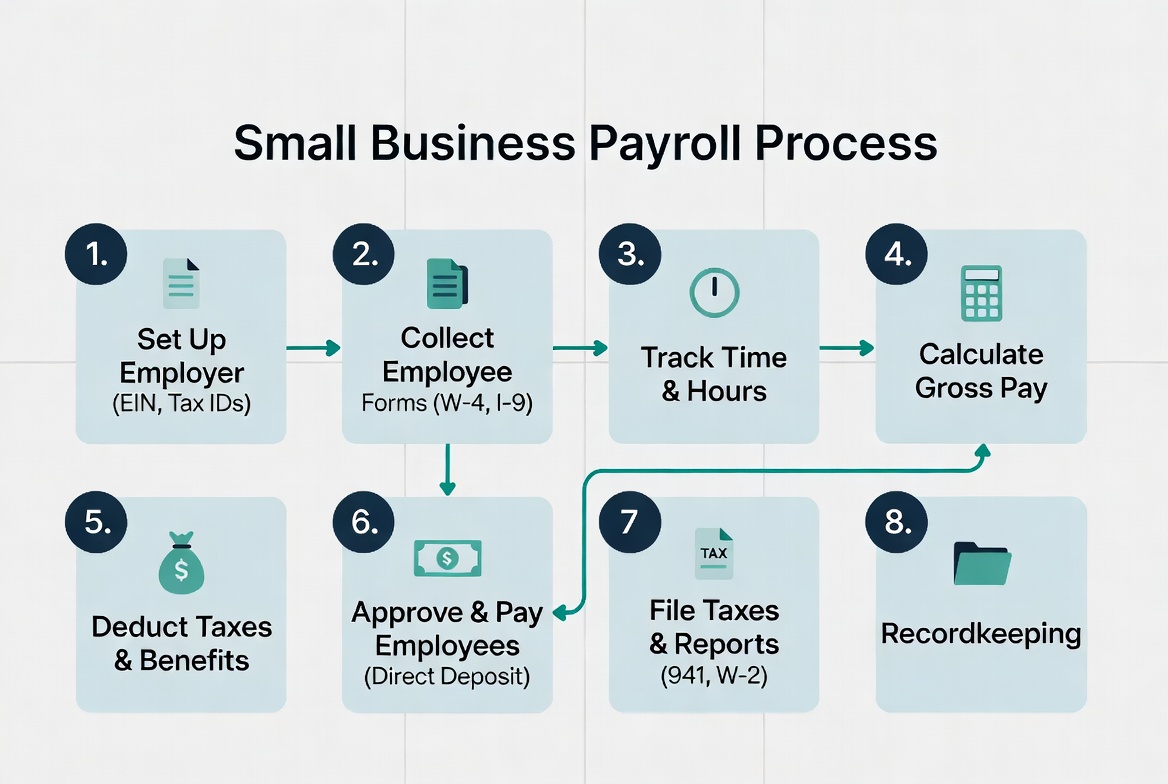
Payroll processing is the complete cycle of paying your employees — calculating gross wages, withholding the correct taxes, deducting benefits, issuing net pay via direct deposit or check, and remitting the withheld taxes to the IRS and state agencies on time.
For small businesses, payroll also includes:
Filing quarterly Form 941 (employer’s quarterly tax return)
Filing annual Form 940 (federal unemployment tax)
Issuing W-2 forms to employees by January 31 each year
Issuing 1099-NEC forms to contractors paid $2,000 or more
Every time you run payroll, three things must happen correctly — the employee gets paid the right amount, the right taxes are withheld, and those taxes are deposited to the IRS on schedule.
Step 1 — Get Your Employer Identification Number (EIN)
Before you can process payroll, you need an Employer Identification Number (EIN) from the IRS. This is your business’s federal tax ID — required for all payroll tax filings, W-2s, and 1099s.
You only need to do this once — your EIN stays with your business permanently
If you already have an EIN from a previous business activity, you can use the same number.
Step 2 — Register for State and Local Payroll Taxes
In addition to federal payroll taxes, most states require employers to register to withhold and remit state income tax and state unemployment insurance (SUTA) on behalf of employees.
What to register for:
State income tax withholding — register with your state’s department of revenue
State unemployment insurance (SUTA) — register with your state’s department of labor
Local payroll taxes — required in some cities and counties (Philadelphia, New York City, Ohio municipalities, etc.)
Registration is typically done online through your state’s business portal. Deadlines vary by state — register before you hire your first employee.
Step 3 — Collect New Hire Paperwork
Every new employee must complete two critical federal forms before their first payday:
Form W-4 (Employee’s Withholding Certificate)
The W-4 tells you how much federal income tax to withhold from each paycheck. Employees complete this form themselves and submit it to you. Use the withholding information on the W-4 along with IRS Publication 15-T to calculate the correct withholding amount each pay period.
Form I-9 (Employment Eligibility Verification)
The I-9 verifies that your employee is legally authorized to work in the United States. You must verify the employee’s identity and work authorization documents (passport, driver’s license + Social Security card, etc.) within 3 business days of their start date.
Additional documents to collect:
Direct deposit authorization form (bank account and routing number)
State W-4 equivalent (required in most states)
Signed employment contract or offer letter
Keep all new hire records on file for the duration of employment plus 3 years after termination.
Step 4 — Choose Your Pay Schedule
You need to decide how often you will pay your employees. The four standard options are:
Pay Schedule
Pay Periods Per Year
Best For
Weekly
52
Hourly workers, construction, restaurants
Bi-weekly
26
Most small businesses — most popular
Semi-monthly
24
Salaried employees
Monthly
12
Executive or contract staff
Most common choice: Bi-weekly (every two weeks) works well for the majority of small businesses — it balances cash flow predictability with employee satisfaction.
Once you choose a pay schedule, stick to it. Most states have laws requiring advance notice before changing pay frequency, and some states mandate minimum pay frequency (e.g., California requires at least semi-monthly payment for most employees).
Step 5 — Calculate Gross Pay
Gross pay is the total amount an employee earns before any deductions. How you calculate it depends on whether the employee is hourly or salaried.
Salaried Employees
Divide the annual salary by the number of pay periods per year.
Example: Annual salary of $52,000 paid bi-weekly $52,000 ÷ 26 pay periods = $2,000 gross pay per paycheck
Hourly Employees
Multiply hours worked by the hourly rate. Add overtime for any hours over 40 in a workweek (federal overtime rate = 1.5× regular rate).
Example: 45 hours worked at $18/hour 40 hours × $18 = $720 5 overtime hours × $27 = $135 Total gross pay = $855
Also include in gross pay:
Commissions and bonuses
Paid time off (PTO) used
Holiday pay
Tips (for tipped employees)
Step 6 — Calculate and Withhold Payroll Taxes
This is the most critical — and most complex — step in payroll processing. You must withhold the correct amount of each tax from every employee’s paycheck.
Federal Payroll Taxes (FICA)
Social Security Tax
Employee share: 6.2% of gross wages
Employer share: 6.2% (you pay this separately)
Wage base limit: $176,100 in 2026 (no Social Security tax on wages above this)
Medicare Tax
Employee share: 1.45% of all wages (no wage cap)
Employer share: 1.45%
Additional Medicare Tax: 0.9% on wages over $200,000 (single) — employee only
Example: Employee earns $3,000 gross pay Social Security withheld: $3,000 × 6.2% = $186 Medicare withheld: $3,000 × 1.45% = $43.50 Total FICA withheld from employee: $229.50 Employer FICA match: $229.50 Total FICA remitted to IRS: $459
Federal Income Tax Withholding
Use the employee’s Form W-4 and IRS Publication 15-T (Employer’s Tax Guide) to calculate the correct federal income tax withholding for each pay period. Most payroll software does this automatically based on the W-4 information you enter.
State Income Tax Withholding
Withhold state income tax based on your state’s withholding tables and the employee’s state W-4. Nine states have no income tax: Alaska, Florida, Nevada, New Hampshire, South Dakota, Tennessee, Texas, Washington, and Wyoming.
State Unemployment Insurance (SUTA)
This is an employer-only tax — do not deduct it from employee wages. SUTA rates and wage bases vary by state and are based on your business’s claim history.
Federal Unemployment Tax (FUTA)
Also employer-only. FUTA rate is 6% on the first $7,000 of each employee’s wages per year. Most employers qualify for a 5.4% credit (if SUTA is paid on time), reducing the effective FUTA rate to 0.6% per employee.
Step 7 — Process Deductions and Benefits
After withholding taxes, process any voluntary deductions the employee has authorized:
Pre-tax deductions are subtracted from gross pay before calculating federal income tax withholding, which lowers the employee’s taxable income and reduces their tax bill.
Step 8 — Calculate Net Pay
Net pay is what the employee actually receives — also called take-home pay.
Net Pay = Gross Pay − All Tax Withholdings − All Deductions
Example: Gross pay: $3,000 Federal income tax withheld: $340 Social Security withheld: $186 Medicare withheld: $43.50 State income tax withheld: $120 Health insurance premium: $150 401(k) contribution: $90 Net pay: $3,000 − $929.50 = $2,070.50
Once net pay is calculated, issue payment through one of these methods:
Direct Deposit (Recommended)
Direct deposit is the fastest, most reliable, and most preferred payment method. Employees provide their bank account and routing numbers on their authorization form. Most payroll software processes direct deposit 1–2 business days before payday — so initiate payroll early.
Processing timelines:
Standard direct deposit: 2 business days before payday
Next-day direct deposit: available on some payroll platforms (QuickBooks, Gusto)
Same-day direct deposit: available on premium plans
Paper Check
If an employee does not have a bank account or prefers a check, issue a paper paycheck with a pay stub showing gross pay, all deductions, and net pay. Keep a copy for your records.
Pay Cards (Payroll Debit Cards)
A prepaid debit card loaded with the employee’s net pay each payday. Useful for employees without bank accounts.
Step 10 — Deposit Payroll Taxes to the IRS
Withholding taxes from employee paychecks is only half the job — you must also remit those taxes to the IRS on a strict schedule. Failure to deposit on time is one of the most common — and most expensive — IRS penalties small businesses face.
Federal Tax Deposit Schedule
The IRS assigns you a deposit schedule based on your total payroll tax liability from the previous lookback period:
Monthly depositor: If your total payroll tax liability was $50,000 or less in the lookback period, deposit taxes by the 15th of the following month.
Semi-weekly depositor: If your liability exceeded $50,000, deposit taxes within 3 business days of each payday.
Next-day rule: If you accumulate $100,000 or more in payroll tax liability on any day, deposit it the next business day regardless of your schedule.
How to Deposit
All federal payroll tax deposits must be made electronically through the Electronic Federal Tax Payment System (EFTPS) at eftps.gov. Paper checks are not accepted for federal tax deposits.
Deposit the combined amount of:
Employee federal income tax withheld
Employee Social Security and Medicare withheld
Employer Social Security and Medicare match
Step 11 — File Quarterly and Annual Payroll Tax Returns
Form 941 — Employer’s Quarterly Federal Tax Return
File Form 941 every quarter to report:
Total wages paid
Federal income tax withheld
Social Security and Medicare taxes (employee + employer share)
Any credits or adjustments
Form 941 due dates 2026:
Q1 (Jan–Mar): April 30, 2026
Q2 (Apr–Jun): July 31, 2026
Q3 (Jul–Sep): October 31, 2026
Q4 (Oct–Dec): January 31, 2027
Form 940 — Annual Federal Unemployment Tax Return
File Form 940 once per year to report and pay FUTA taxes. Due date: January 31, 2027 (for tax year 2026)
Form W-2 — Wage and Tax Statement
Issue a W-2 to every employee by January 31, 2027. File copies with the Social Security Administration by the same date.
Form 1099-NEC — Nonemployee Compensation
Issue a 1099-NEC to every independent contractor paid $2,000 or more in 2026 by January 31, 2027.
Federal law requires employers to keep payroll records for at least 4 years after the tax due date. Records to keep:
Employee W-4 forms
Payroll registers (record of each pay period)
Tax deposit records and confirmation numbers
Form 941 and 940 copies
W-2 copies
Time sheets and attendance records
Garnishment orders and records
Payroll Processing Timeline: Every Pay Period
When
Action
Start of pay period
Confirm hours worked, approve timesheets
3–4 days before payday
Run payroll calculations in your software
2 days before payday
Initiate direct deposit
Payday
Employees receive payment, distribute pay stubs
Same week as payday
Record payroll entries in bookkeeping software
Per deposit schedule
Deposit federal payroll taxes via EFTPS
Monthly (15th)
Deposit state payroll taxes (varies by state)
End of quarter
File Form 941
Common Payroll Mistakes to Avoid
Misclassifying employees as contractors Calling a W-2 employee a 1099 contractor to avoid payroll taxes is one of the most serious IRS violations a small business can make. The IRS looks at behavioral control, financial control, and the type of relationship. If you control when, where, and how someone works, they are likely an employee.
Missing tax deposit deadlines The IRS failure-to-deposit penalty ranges from 2% to 15% of the unpaid amount depending on how late the deposit is. Set calendar reminders and use EFTPS autopay to never miss a deposit.
Incorrect overtime calculations Federal law requires overtime at 1.5× the regular rate for all hours over 40 in a single workweek — not a pay period. Salaried non-exempt employees are also entitled to overtime in most cases.
Not updating employee W-4s Employees can update their W-4 at any time. When they do, update your payroll system immediately for the next pay period.
Do You Need Payroll Software?
Manually processing payroll for even one or two employees is risky and time-consuming. Payroll software automates tax calculations, direct deposit, quarterly filings, and year-end W-2s — eliminating the most common and costly errors.
Top payroll software options for small business in 2026:
Gusto — Best overall, easiest to use, $49/month + $6/employee
QuickBooks Payroll — Best for QuickBooks users, $45/month + $5/employee
OnPay — Best value, $40/month + $6/employee
ADP Run — Best for scaling businesses, custom pricing
Q: How long does it take to process payroll? With payroll software, running payroll for a small team typically takes 5–15 minutes per pay period once everything is set up. Initial setup takes 1–3 hours.
Q: What is the penalty for paying employees late? In addition to unhappy employees, late payment of wages may violate state labor laws and expose you to civil claims. IRS late deposit penalties apply separately to the tax side.
Q: Can I process payroll myself without an accountant? Yes — payroll software is designed for non-accountants. Most small business owners process their own payroll successfully. However, having your accountant review your setup at least once a year is a good practice.
Q: What is the difference between payroll processing and payroll administration? Payroll processing refers to the act of calculating and issuing pay each period. Payroll administration is the broader function including record-keeping, compliance, benefits management, and tax filings.
Q: How do I handle payroll for remote employees in other states? You must register as an employer in each state where your remote employees work and comply with that state’s withholding, unemployment, and labor laws. Multi-state payroll software like Gusto or ADP handles this automatically.
Final Thoughts
Processing payroll for small business does not have to be overwhelming. Follow these 12 steps every pay period — calculate gross pay, withhold the right taxes, issue payment on time, deposit taxes to the IRS on schedule, and file your quarterly returns.
The single best investment you can make as a small business employer is reliable payroll software. It eliminates calculation errors, automates tax deposits and filings, and gives you and your employees confidence that every paycheck is right.
For more payroll guides, tax calculators, and small business finance tips, visit Finance Ledger Tips.

Leave a Reply